Monday, January 30, 2012

Sunday, January 29, 2012
How to configure Outlook GMail account?
 Why should I use Outlook for my Gmail address?
Although the web based system of Google Gmail is one of the most feature rich webmail platforms, you may want to handle your Gmail account & messages from a client email software program such as Microsoft Outlook. For example, if you are using other email addresses and not just the Gmail account, most likely you would want to read and handle all your email accounts from the same interface & program.
To set up your Outlook 2007 client to work with Gmail:
- Enable IMAP in Gmail. Don't forget to click Save Changes when you're done.
- Open Outlook.
- For new setups, select Do not upgrade.
- Click Yes.
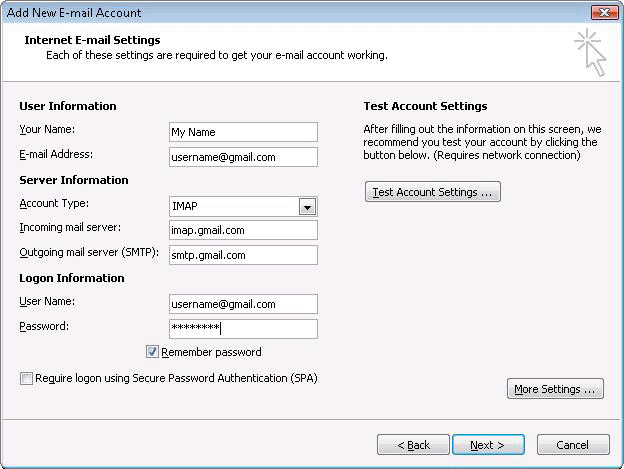
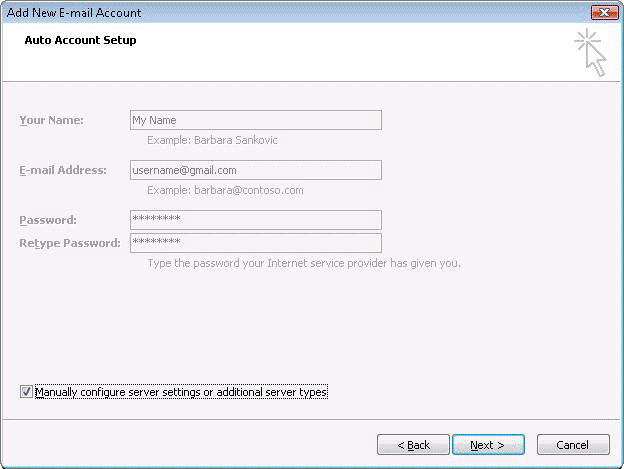
- Enter your display name, email address (including '@gmail.com'), and password. Google Apps users, enter your full email address, e.g. 'username@your_domain.com.'
- Select the 'Manually configure server settings or additional server types' checkbox.
- Select Internet E-mail.
- Settings: name, full email address (including '@gmail.com' or '@your_domain.com')
- In the Account Type dropdown menu, select IMAP. In the 'Incoming server name' section, enter: imap.gmail.com and in the 'Outgoing server name (SMTP)' section, enter: smtp.gmail.com.
- In the 'User Name' field, give your full Gmail address, including '@gmail.com' or '@your_domain.com.'
- After creating these settings, clicking Next takes you to the end of the setup.
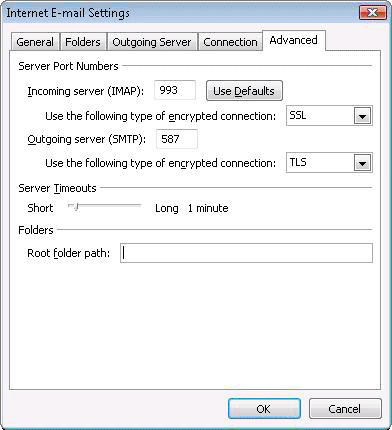
- In the Tools menu, select Options then Mail Setup. Under 'Email Accounts,' click E-mail Accounts.
- Select an account, and click Change above the list of accounts. Click More Settings, then the Advanced tab.
- Incoming server must be 993, and must use SSL3 encryption.
- Outgoing server can use 587, TLS4 encryption.
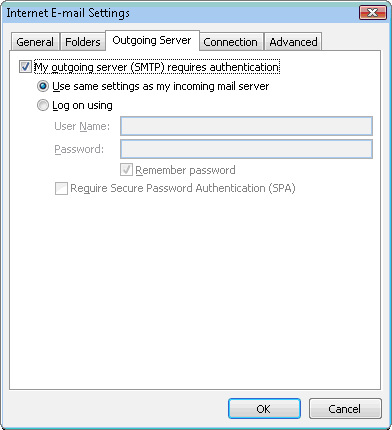
- Click the Outgoing Server tab. Make sure that 'My outgoing server (SMTP) requires authentication' is selected. The radio button 'Use same settings as my incoming mail server' should also be selected.
- Click OK > Next > Finish > Close > OK.
- Check our recommended client settings, and adjust your client's settings as needed.
- IMAP: IMAP (Internet message access protocol) lets you download messages from Gmail so you can access your mail with a program like Outlook Express or Apple Mail. IMAP syncs the actions you take in Outlook Express or Apple Mail with Gmail so if you read a message in your mail client, it'll be marked as read in Gmail.
- domain: A domain is a name for an IP address and is more commonly recognized as a website or web address. For example, Google.com is a domain.
- SSL: SSL (secure socket layer) is a way of changing data such as your username and password into code as it travels across the Internet, so that the data will be secure and private.
- TLS: TLS (Transport Layer Security) is a way of changing data such as your username and password into code as it travels across the Internet, so that the data will be secure and private. With mail delivery, TLS begins with an unsecured connection to the mail servers, and then upgrades to a secure connection once information is sent.
Reference Site Link:
Saturday, January 28, 2012
Thursday, December 8, 2011
Fotigate 60C equal cost load balancing

OK!There are two internet links.Customer wants to use both links concurrently.According to the network diagram, one is WiMax and another one is ADSL.Both links have been subscribed to same ISP.
How do you do equal cost load balancing on Fortigate firewall?
First of all, assign ip addresses on network interfaces.

In equal cost load balancing, the distance of both routes must be same.

Now we can check the routing table.


Subscribe to:
Comments (Atom)